
Baby Connect: Newborn Tracker
Seacloud SoftwareParenting
4.52.53K Reviews
- Version
- 10.43
- Installs
- 100.00K
- Age Rating
- Everyone
Screenshots
Our Review of Baby Connect: Newborn Tracker
 Analysis by Appyee
Ever found yourself juggling too many baby tasks at once? Enter Baby Connect, the app that's practically a digital parenting assistant. I’ve been using it for a while, and let me tell you, it’s like having a personal assistant who’s all about baby business. So, let’s dive in and see what makes this app a must-have for new parents.
When a shared log meets a weak connection
Shared tracking is most useful when the next caregiver needs the latest detail, not a message remembered from hours ago. A parent can log a feed, then another caregiver can check what happened before offering another one. That handoff is a real strength of a shared record, but it also makes connectivity part of the routine: the value of the shared view depends on entries syncing when people need them.
I would treat the app as a convenient record rather than the only place to communicate something urgent. If you are passing along an important change while rushing out the door, say it directly as well as recording it. That is not a knock on the tracker; it is a sensible distinction between a log that helps everyone stay oriented and a conversation that needs immediate attention.
Designed for quick checks on a phone
Baby care happens in awkward little gaps: beside a cot, during a feed, or while one adult is getting ready to leave and another is taking over. A phone-based timeline can make those transitions less dependent on memory. I’d keep the most-used activities easy to reach and avoid turning every small observation into a separate task. The practical win is a short, consistent record, not a perfect diary.
For a household with several caregivers, a useful habit is to agree on what counts as a completed entry. If one person logs a feed immediately and another waits until later, the timeline can become less useful as a live handoff. A simple shared routine—record the event once it is finished, and add a short note only when context matters—keeps the record readable without demanding constant attention.
Recovering from missed or delayed entries
No family logs every event at exactly the right moment. If you forget a diaper change or nap while managing a busy afternoon, the best response is to add what you remember and mark uncertainty in a note where that option makes sense, rather than guessing at a precise time. An imperfect record can still reveal broad patterns; false precision can make later review less trustworthy.
Connectivity can complicate the handoff if an entry does not appear for another caregiver right away. Before relying on a missing update, check whether the person who recorded it can see it on their own device and confirm the detail directly if it affects the next care decision. I would not assume a delay means an event was lost, but I also would not treat a shared screen as proof that a time-sensitive message has been received.
Keeping the log useful without over-recording
A baby tracker can accumulate sensitive family routines, so I’d be deliberate about who gets access and what the household actually needs to record. Caregivers do not necessarily need every detail to do their part well. Agreeing on a few essentials—such as feeds, sleep, diapers, and anything the family wants to bring up at a checkup—can make the log more useful and easier to maintain.
There is also a trade-off between detail and effort. Growth, milestones, appointments, and daily care can sit together in one place, but recording everything may make the app feel like another job. I’d start with the events that help the next handoff or answer a question you genuinely have, then add categories only when they solve a real problem. That approach also makes graphs more meaningful because the underlying entries are more consistent.
All-in-One Baby Tracking
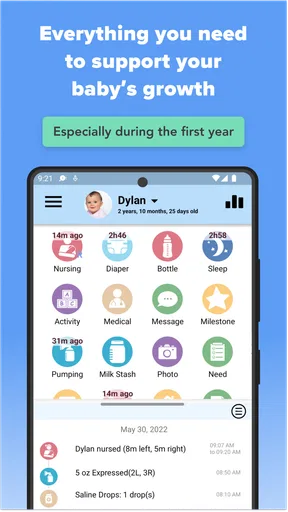
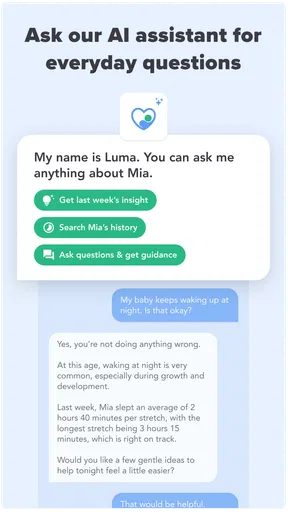
Baby Connect is your go-to for keeping track of every little detail of your baby’s life. We’re talking diaper changes, feedings, sleep patterns—you name it. The app’s layout is super intuitive, which means you won’t be fumbling around trying to find what you need in the middle of a 3 AM feeding session. The dashboard is neat and organized, making it easy to log activities quickly.
Easy-to-Use Interface
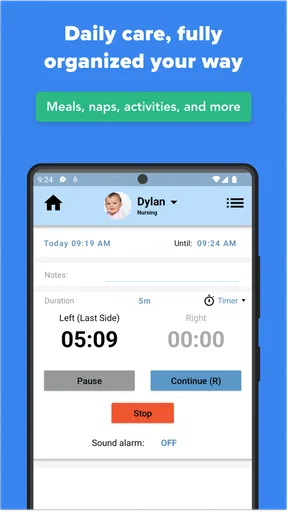
When you’re sleep-deprived, the last thing you need is a complicated app. Fortunately, Baby Connect nails it with simplicity. The icons are clear and the menus are straightforward. It’s almost like the developers knew exactly how tired we parents would be and designed it to work seamlessly despite that. Adding entries is a breeze, and you can customize the dashboard to focus on the activities you log most often.
Data Sharing with Caregivers
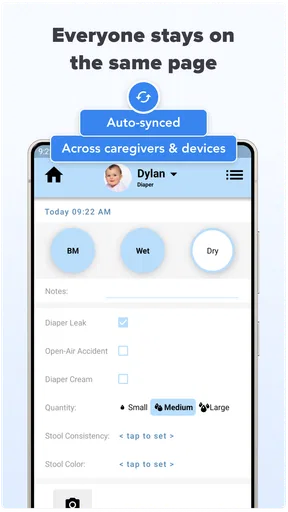
One of the coolest features? The ability to share data with others. Whether it's your partner, a babysitter, or your enthusiastic in-laws, everyone can stay in the loop. The sync feature is golden; it updates in real-time, so no more double-checking if Grandma remembered the nap time. Just connect, share, and relax knowing everyone’s on the same page.
Detailed Analytics
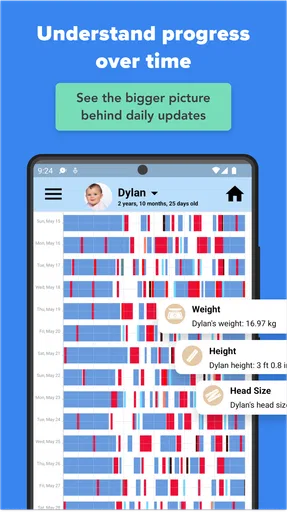
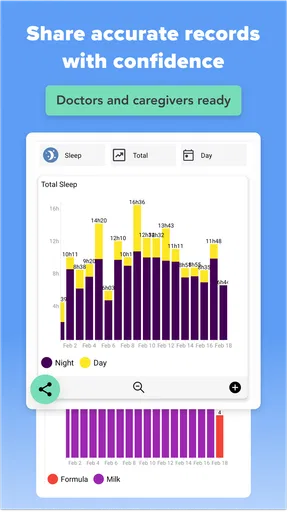
For those of us who love data (and let’s be real, who doesn’t?), this app offers comprehensive graphs and charts. You can spot trends in your baby’s habits like a pro. Want to know if the little one’s sleep schedule is improving? Just check the analytics. It’s all neatly laid out, helping you make informed decisions about your baby’s routine.
Customization and Alerts
We all know that every baby is different, and Baby Connect acknowledges that. You can tailor the app to suit your baby’s unique needs. Set up custom alerts for feedings or medications and never miss a beat. It’s like having a personal reminder service that’s solely focused on your baby’s well-being.
Additional Features
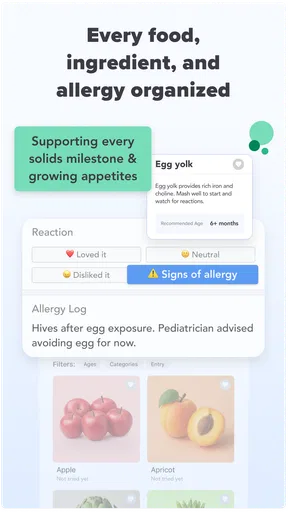
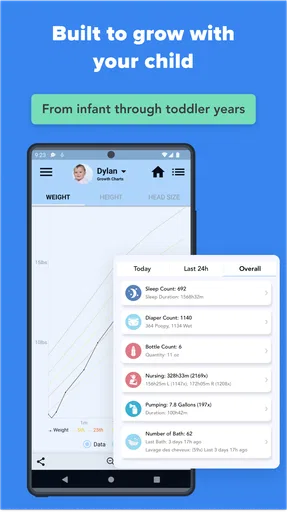
The app doesn’t stop at the basics. There are features for tracking growth, milestones, and even doctor appointments. It’s like having a mini health log in your pocket. Plus, the timeline view is great for a quick overview of the day, helping you plan better.
In case you’re wondering about security, rest easy. All data is backed up and you can access it anytime. The app also supports multiple platforms, so whether you’re an Android or iOS user, you’re covered.
Who benefits most from this kind of tracker
I see the clearest fit for families who regularly hand care between two or more people. A parent returning to work, a partner covering early mornings, or a babysitter taking over for an afternoon can all benefit from a single history of feeds, sleep, and diaper changes. It is especially handy when parents are trying to answer a practical question together, such as whether a new routine is changing nap timing, instead of piecing together separate notes and texts.
It can also be useful for a parent who wants a concise record to discuss at an appointment. I would use the timeline and growth or milestone records to help recall what happened, then treat that information as context for a conversation with a clinician—not as a diagnosis or a substitute for professional advice. For families already comfortable with a shared digital routine, the app can reduce the mental work of remembering small details.
A realistic day with several handoffs
Picture a parent handling the first feed, a partner taking the baby later, and a relative arriving in the afternoon. Instead of asking each person to remember exact times, the family can record the care they provide and check the running timeline before the next handoff. If the relative notices a pattern worth mentioning, the family can add the relevant detail and review it later rather than relying on a rushed conversation at the door.
The useful part is not logging every minute. It is having enough shared context to avoid repeated questions and to make the next caregiver’s first few minutes easier. I’d keep the routine light: log the core event, add a note when something differs from the usual pattern, and use the timeline to orient the next person. That is a more sustainable use than treating the app as a complete record of every moment.
How it differs from notes and single-purpose trackers
The usual alternative is a paper notebook, a phone note, or a separate tool for each kind of tracking. A notebook can be quick and does not require managing a shared digital account, but it is less convenient when caregivers are in different places or when you want to review several kinds of activity together. A basic note app is flexible, yet the family has to invent its own structure and may end up with inconsistent entries.
A single-purpose sleep or feeding tracker may suit someone who only wants to answer one narrow question. Baby Connect takes a broader approach, bringing everyday care records together with growth, milestones, and appointments. That range is its appeal, but it can also feel like more than a minimalist household needs. If you only want to record one event occasionally, a simple note may be faster and less demanding.
Small habits that make the record better
One non-obvious benefit of customizing the dashboard is that it can help prevent overlogging. Put the actions your family actually uses within easy reach, and leave less relevant tracking out of the daily flow. Then review the record occasionally for missing stretches or inconsistent habits before drawing conclusions from its graphs. A chart is only as helpful as the entries behind it, so a modest, steady record is more valuable than a burst of detailed logging followed by gaps.
For caregiver sharing, I’d also agree on a naming and note-taking style. Short notes with practical context are easier to scan than long explanations, especially when somebody is checking the phone with one hand. If an entry needs a correction, make the correction rather than adding a second version that could confuse the timeline. These small conventions matter more as more people contribute.
Cost, setup, and choosing the right level of detail
The app is free to download, and in-app purchases range from $4.99 to $119.99 per item. I’d begin with the free experience and decide whether the family’s actual routine justifies paying for anything before committing. Since the range is broad, check the purchase details in the app before buying; a family should choose based on the specific feature it wants, not on a general assumption that every household needs an upgrade.
Baby Connect is rated for Everyone, and Seacloud Software has kept it in the parenting space since its release on August 25, 2011. The current version is 10.4 and it requires Android 6.0 or later. Its average rating is 4.5 from around 11,000 ratings, with around 2,500 written reviews and over 100,000 installs. Those figures suggest an established audience, but they do not tell me whether its logging style fits your household; the best test is whether caregivers will actually use the shared routine.
Where I would draw the line
I would skip a detailed tracker if recording care creates tension, adds stress, or makes a parent feel judged by an incomplete log. A baby’s day will not always follow tidy patterns, and charts should not turn normal variation into a reason to worry. I would also choose a simpler method if only one person needs an occasional reminder, or if the family prefers not to keep baby routines in a shared app.
For anyone trying it, I’d start with a small set of daily entries and involve only the caregivers who need them. Check that everyone understands how to add and read an event, and use a direct conversation for anything urgent. If the log makes handoffs calmer after a short trial, keep it; if it becomes another obligation, scale back or switch to a notebook. The point is to support care, not to make parents serve the record.
Final Thoughts
If you’re looking for an app that takes the chaos out of tracking your baby’s daily needs, Baby Connect is definitely worth checking out. It’s packed with features yet remains user-friendly, making it an essential tool for any new parent. So, give it a try and see how it transforms your parenting routine. Trust me, your future self (and your baby) will thank you!
Verdict
Strengths of Baby Connect: Newborn Tracker
- Comprehensive tracking of baby activities.
- Syncs across multiple devices seamlessly.
- User-friendly interface for easy navigation.
- Customizable notifications for reminders.
- Detailed growth charts and reports.
Limitations of Baby Connect: Newborn Tracker
- Can overwhelm with too many features.
- Premium version is relatively pricey.
- Some features require a learning curve.
- Occasional sync delays reported.
- Limited customization of daily logs.
Similar Picks in This Category
View All
Family Space
Motorola Mobility LLC.3.9

شرطة الأطفال - مكالمة وهمية
Oub Apps4.1

Findmykids: Parental Control
LETEM LTD4.6

Pregnancy + | Tracker App
Philips Electronics UK Limited4.8

Policía de niños - para padres
Kids police4.7

Pregnancy App
Amila4.9
Frequently Asked Questions
What features does Baby Connect offer for tracking my baby's activities?
Baby Connect provides comprehensive tracking of your baby's daily activities, including feeding, diaper changes, sleep patterns, and growth metrics. It also offers customizable reminders, charts, and syncs data across devices for easy sharing with caregivers and family members, making it a versatile tool for busy parents.
Is Baby Connect available on both Android and iOS platforms?
Yes, Baby Connect is available for download on both Android and iOS platforms. This ensures that users can access the app regardless of their device preference, allowing for consistent tracking and data synchronization across multiple devices and users.
Can I use Baby Connect to share my baby's progress with others?
Absolutely! Baby Connect allows you to share real-time updates and detailed reports with family members, caregivers, and healthcare providers. By syncing data across devices, everyone involved in your baby's care can stay informed and connected, enhancing collaborative care efforts.
Does Baby Connect offer any customization options for tracking?
Yes, Baby Connect offers extensive customization options, allowing users to tailor the app to fit specific needs. You can customize the tracking categories, set personalized reminders, and choose how you want to visualize the data through charts and reports, providing a personalized user experience.
Are there any additional costs associated with using Baby Connect?
While Baby Connect offers a one-time purchase option for full access to all features, there may also be additional costs for premium features or services. It’s recommended to check the app’s details on your platform’s app store for specific pricing information and available in-app purchases.
